At home on your desktop
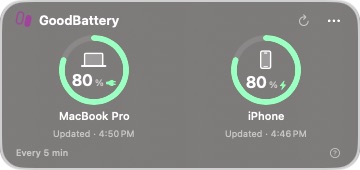
A slim 360 × 170 widget stays behind your apps. Drag its heading to move it; GoodBattery remembers the position.
Mac + iPhone battery widget
Keep your Mac and iPhone battery readings together in a slim glass widget on your desktop, with clear timestamps and wireless iPhone checks after pairing.
Stay in the loop
Get an occasional email when GoodBattery receives an important new version. No weekly newsletter.
The useful part
GoodBattery keeps Mac and iPhone battery readings together in a small glass widget that stays on your desktop behind app windows. Your Mac updates every minute; your iPhone is checked every five minutes while the Mac is awake. For wireless checks after unplugging, pair your iPhone once with a USB data cable, choose Trust, enable its Wi-Fi connection in Finder, and keep both devices on the same local network. A missed check keeps the last confirmed reading visible with its timestamp. This early beta requires an Apple silicon Mac with macOS 27 or newer.
Finding the right tool
GoodBattery is a native Mac desktop widget with clear and frosted glass, battery rings, and timestamps for the last confirmed readings. It stays behind app windows, remembers where you drag it, and follows your Mac’s light or dark appearance. Mac readings update every minute; iPhone checks run every five minutes while the Mac is awake.
Wireless iPhone checks require a one-time USB data connection, Trust on the iPhone, its Wi-Fi connection enabled in Finder, and both devices on the same local network. No iPhone companion app, account, or cloud service is needed. Early Mac beta 1.1 requires Apple silicon and macOS 27 or newer; the app is ad hoc signed and not notarized.
What it does
A slim 360 × 170 widget stays behind your apps. Drag its heading to move it; GoodBattery remembers the position.
Native clear and frosted glass, compact battery rings, and system colors follow your Mac’s light or dark appearance.
Mac battery readings update every minute. iPhone checks run every five minutes while the Mac is awake, with a manual refresh when you want another check.
Each reading has a timestamp. A missed iPhone check is marked as last known, and readings older than ten minutes are marked stale.
Enable Start at Login from the menu-bar controls to reopen GoodBattery automatically after signing in to your Mac.
Battery readings stay on your Mac. After the one-time pairing, wireless iPhone checks use your local network without a cloud service or separate iPhone app.
How GoodBattery stays good
Keep looking