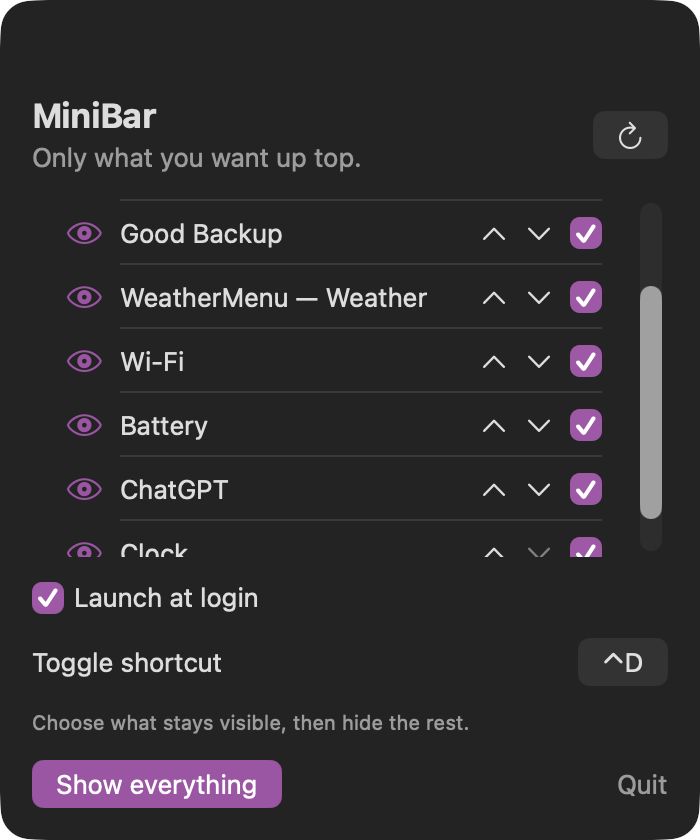
Pick exactly what stays
One switch beside each discovered item controls whether it remains visible when MiniBar is active.
macOS menu-bar organizer

Choose exactly which menu-bar items stay visible, rearrange them from one compact list, and hide or reveal the rest with a shortcut.
Stay in the loop
Get an occasional email when MiniBar receives an important new version. No weekly newsletter.
The useful part
MiniBar reads the menu-bar items already running on your Mac and puts them into one clear list. Keep chosen items visible, tuck the rest away, rearrange their order, and show or hide your saved selection from anywhere with a customizable shortcut. MiniBar remembers the layout after sign-out and can reopen automatically when you log in.
Finding the right tool
MiniBar is a focused menu-bar organizer for macOS 27. It lists the items already running on your Mac so you can decide exactly what stays visible and tuck everything else away.
A customizable global shortcut reveals or hides the saved selection, while launch at login and local preferences restore the same setup after signing in again.
What it does
One switch beside each discovered item controls whether it remains visible when MiniBar is active.
Drag items into the order you want, or use the arrow controls for precise one-step moves.
Use Control-D by default or record another global shortcut to reveal or hide the saved selection.
Launch at login and saved visibility choices restore the same calm menu-bar setup after a new Mac session.
How MiniBar stays good
Keep looking