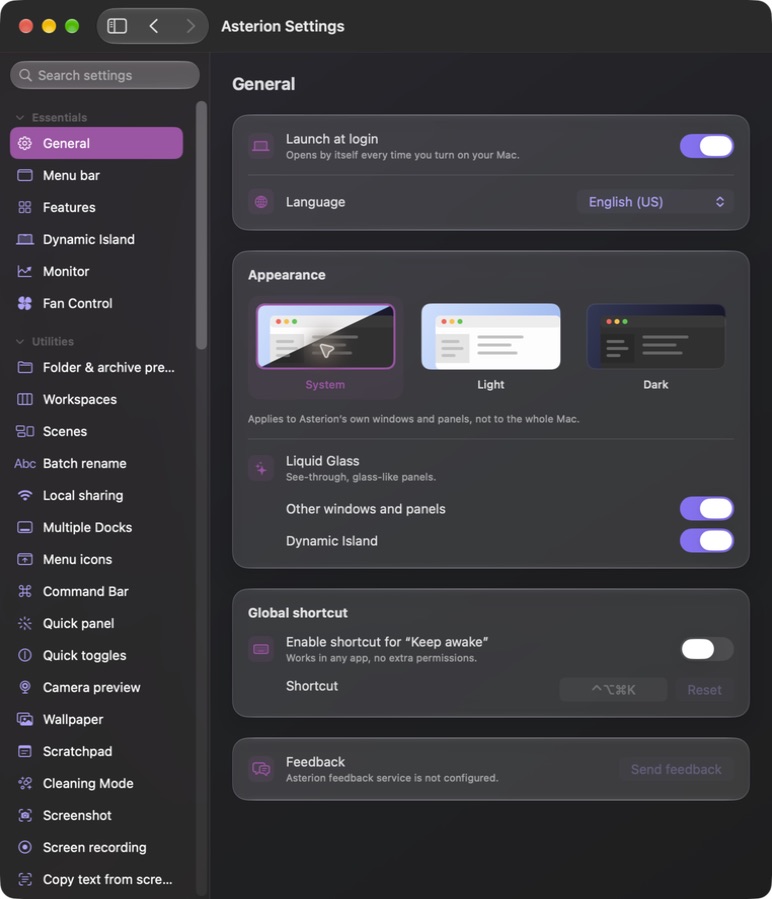
Dynamic Island
Keep media, timers, scratchpad and supported AI-agent usage readings nearby, with display choices for multi-screen setups.
Mac menu-bar utility suite
A compact Mac toolbox with a Dynamic Island, window controls, clipboard, capture tools and useful extras for multiple displays.
Stay in the loop
Get an occasional email when Asterion receives an important new version. No weekly newsletter.
The useful part
Asterion combines the native utility engine and interface of Vorssaint Utils with Good Tools styling and additional desktop tools. Keep notes, capture your screen, manage windows and clipboard history, and choose which features to enable. This beta is tested on macOS 27.2; some capture and multi-display workflows are still being verified.
Finding the right tool
Asterion is a Good Tools fork of Vorssaint Utils 3.4.1, copyright 2026 Vorssaint, under GPL-3.0-or-later. It adds its own styling and desktop features. This is not an official Vorssaint build.
The bundled AeroSpace engine is MIT-licensed. Corresponding modified source and original license notices are available with the beta download. Accessibility and screen/audio permissions are needed by their respective tools. Upstream hosted uploads and self-updates are disabled.
What it does
Keep media, timers, scratchpad and supported AI-agent usage readings nearby, with display choices for multi-screen setups.
Browse folders with thumbnails and search, and list archive contents without extracting them. Includes an independently written Finder Quick Look extension for Space-bar previews.
Window controls, clipboard history, screenshots, screen recording, a standalone scratchpad, display controls and more in a compact native interface.
Use the bundled AeroSpace engine for optional tiling and workspaces; save and restore window arrangements as scenes.
Hide selected app icons and move supported icons left or right. Add a Dock-style mirror to a secondary display with native settings, icons, compact spacing and auto-hide. The mirror follows Asterion’s shared Liquid Glass option and respects macOS Reduce Transparency. Mirrors do not reproduce Apple’s badges, stacks or private animations exactly.
Preview batch renames with undo, or create a temporary local-network file link. Local sharing is unencrypted and available to anyone with its link on your network.
How Asterion stays good
Keep looking